
I've been using this scientific newsletter since March. Twice a week, I get personalized emails on topics I care about, written in a format that is interesting to me and structured exactly the way I want it. If I want to read the paper, I click the link and go straight to the source.
So I tried to make this as simple as possible. You can access the GitHub here: Scientific Newsletter. For those not familiar with GitHub, think of it as a place where people store code projects, track changes, and share them freely. If you want your own version, fork the repository, make changes, and keep building on top of it.
You do not have to use Codex specifically. I have run versions of this workflow with Codex and Claude Code. The important idea is that you use an AI coding agent that can open the repository, edit files, run commands, and help you configure the project by chatting with it. Codex is OpenAI's coding agent inside ChatGPT and the Codex desktop app. Claude Code is Anthropic's terminal coding agent. Cursor, Windsurf, or another repo-aware coding agent can do the same basic job if you know how to point it at the project.
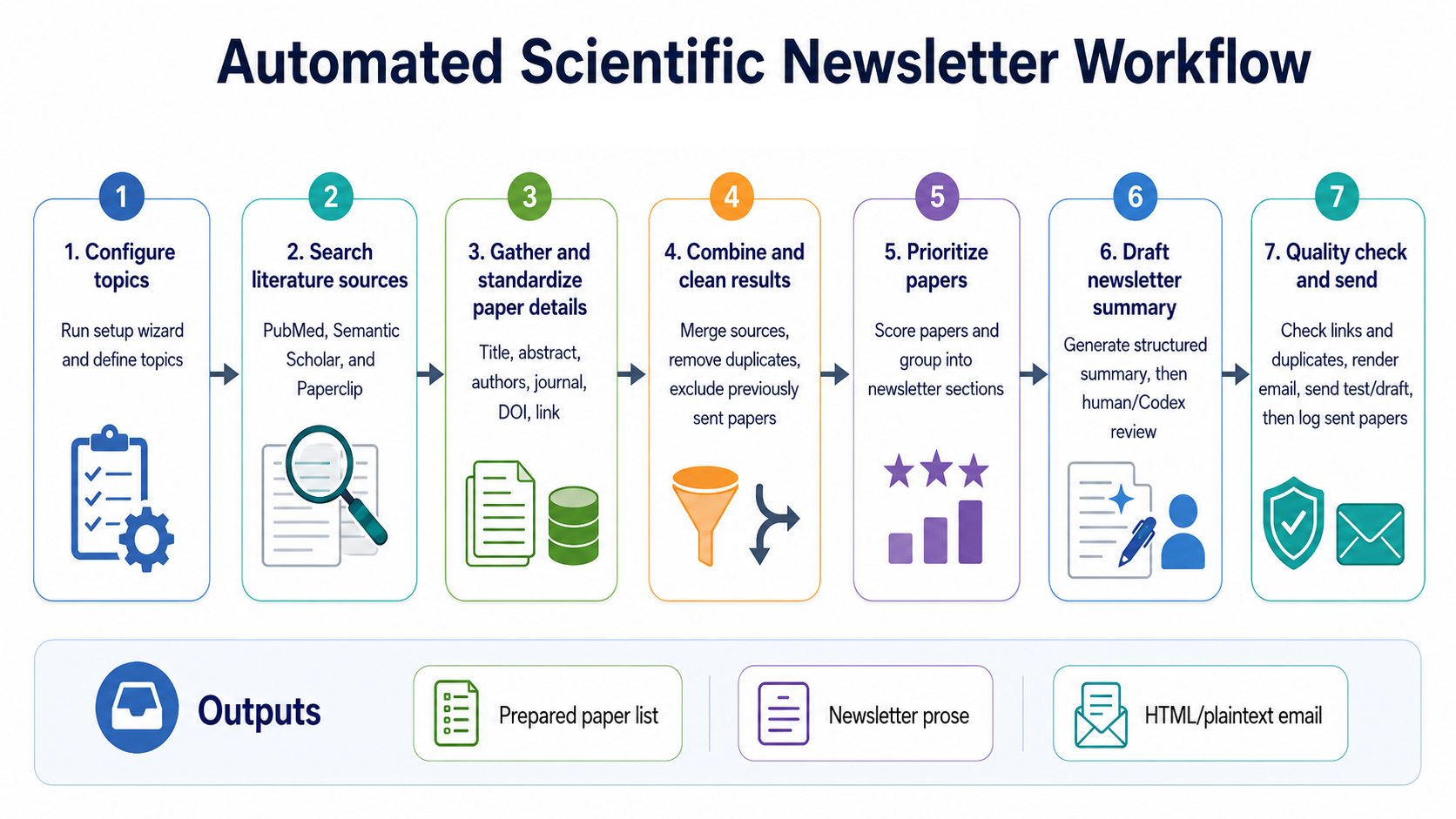
The basic loop: configure topics, search literature sources, clean and deduplicate results, prioritize papers, draft the newsletter, then send a test or email draft.
The current version is mostly abstract and metadata summarization. That is intentional. I am not trying to have the model replace reading full manuscripts. I want it to find new, timely, interesting papers that match what I care about. Paperclip can pull open full-text manuscripts from sources like PubMed Central, bioRxiv, medRxiv, and arXiv when available, but I would rather use that as an optional enrichment layer and read the full paper myself when something looks important.
What This Actually Searches
The newsletter searches the sources I care about, standardizes the results, removes duplicates, and prepares a ranked list for a newsletter issue. The default project uses free sources:
| Source | Cost | What it is doing here |
|---|---|---|
| PubMed | Free, no key needed | Core biomedical search. This is the main source I would keep on for almost everyone. |
| Semantic Scholar | Free API key | Broader scholarly search, especially helpful for AI, methods, computational medicine, and papers that PubMed may not surface cleanly. |
| arXiv | Free, no key needed | Technical preprints, AI, ML, and computational work. |
| Paperclip | Free account/token | AI-friendly paper search and optional open full-text access for PMC, bioRxiv, medRxiv, arXiv, regulatory documents, and trials. |
| Gmail SMTP | Free with a Gmail app password | Sends the newsletter from a dedicated account or creates a test draft. |
The project can be changed. If you want only neuro-oncology, change the topics. If you want Nature, Lancet Oncology, JCO, Red Journal, and NEJM, add journal preferences. If you want a section called "Outside My Bubble," add it. The point of putting this on GitHub is that people can fork it and adapt it for their own specialties.
Step-by-Step Setup
Fork or open the GitHub project
Open the Scientific Newsletter repository. If you want your own editable copy, click Fork in GitHub. If you just want Codex to work with the current project, you can paste the repository URL directly into Codex.
Install Codex
Open ChatGPT on the web. In the top-left area, open Codex under the ChatGPT logo, then download and install the Codex desktop app. If you have an eligible ChatGPT subscription, you should already have access. Codex is basically the version of ChatGPT that can work inside a code repository, run terminal commands, edit files, and help you iterate.
Use another agent if you prefer
This does not have to be Codex. Claude Code, Cursor, Windsurf, or another coding agent can work if it can access the repository and run commands. I have used both Codex and Claude Code for this kind of workflow. Use whatever agent you are comfortable supervising.
Import the repository
In Codex, click Automations, select Create via Chat, then use the plus button to choose GitHub. Connect your GitHub account and select your fork, or paste the Scientific Newsletter repository URL into the chat. Ask it: Set up this Scientific Newsletter project and walk me through the first dry run.
Run the setup wizard
Ask the agent to run scientific-newsletter setup. The wizard asks for the newsletter name, sender email, test recipient, time zone, how often it should run, which weekdays it should run, topics, tone, email mode, and whether review is required before sending.
Choose your topics
Start small. I would use three to five topics first. For example: CNS oncology, radiation oncology, immunotherapy, AI in medicine, and one broader medicine topic. The topic keywords drive the search, so make them concrete: glioblastoma, brain metastases, SRS, large language models medicine, randomized phase 3 oncology.
Set up Semantic Scholar
Go to the Semantic Scholar Academic Graph API page and request a free API key. In the use-case box, say you are building a clinician-facing scientific newsletter that searches recent papers by configured topics, retrieves title and abstract metadata, deduplicates records, and prepares a human-edited digest. Add the key to .env as SEMANTIC_SCHOLAR_API_KEY.
Set up Paperclip
Go to Paperclip, sign in, and follow the terminal login instructions. On a workstation, run paperclip login, finish the browser or verification-code flow, then run paperclip config. For scheduled runs, save the token in .env as PAPERCLIP_API_KEY.
Create a dedicated Gmail account
Create a Gmail account just for the newsletter. Turn on two-factor authentication, create a Gmail app password, and add the SMTP settings to .env. I prefer a dedicated account because it keeps the newsletter separate from my personal inbox and makes testing less annoying.
Run a dry issue
Ask the agent to run scientific-newsletter run --dry-run. This should create discovered papers, prepared paper lists, a prose prompt, and an HTML preview. Open the preview before sending anything. Check what it found, what it missed, and whether the section structure matches what you wanted.
Iterate by chatting
Give feedback in plain language: Make this twice weekly, only include phase 2 or 3 clinical trials, make the summary shorter, add a clinical implications section, prioritize Nature Medicine and JCO, or remove basic science papers unless they are practice-relevant. The useful part is not the first draft. The useful part is that the workflow gets closer to your taste with each issue.
After this, the routine is simple: run the search, review the prepared papers, let the agent draft the issue, inspect the HTML, send yourself a test, then send the actual email if you like it.
The API Keys
All of the APIs used by the starter workflow are free to start. You should still treat the keys like passwords and keep them in .env, which should never be committed to GitHub.
Semantic Scholar:
SEMANTIC_SCHOLAR_API_KEY=replace_with_your_semantic_scholar_key
Paperclip:
PAPERCLIP_API_KEY=replace_with_your_paperclip_key
Gmail SMTP:
SMTP_HOST=smtp.gmail.com
SMTP_PORT=465
SMTP_USERNAME=your.newsletter.account@gmail.com
SMTP_PASSWORD=replace_with_your_gmail_app_password
SMTP_FROM_NAME=Scientific Newsletter
PubMed and arXiv do not require keys for the way this project uses them. I would keep PubMed on by default because it is the cleanest backbone for biomedical literature discovery.
What It Looks Like
Here is an example of the HTML email style from an earlier internal version. Your version can be more formal, more concise, more data-heavy, or more opinionated.
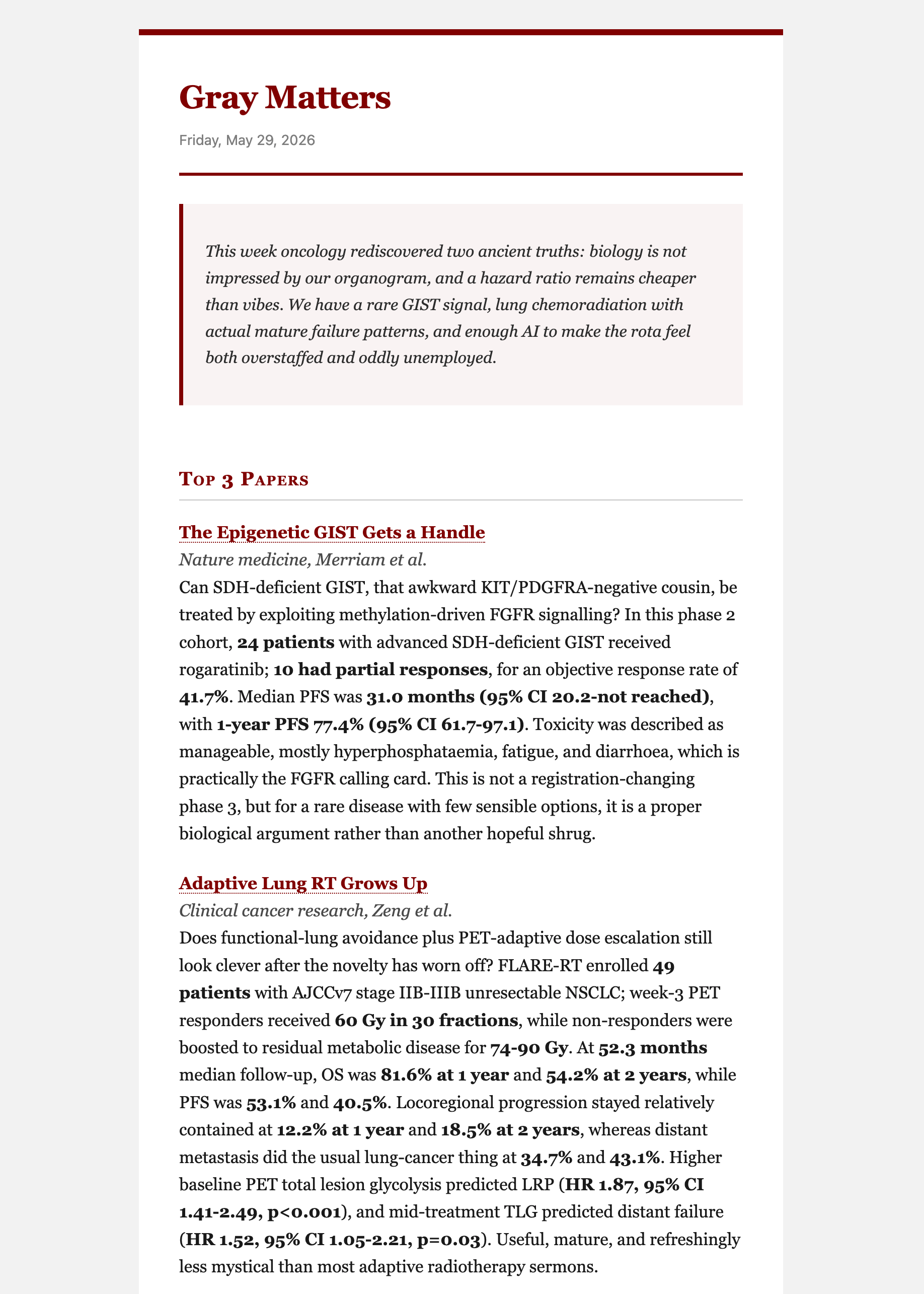
Example output from an earlier internal version. The open-source project is named Scientific Newsletter; this image is here to show the email format.
The easiest way to make it good is to run a few issues and give feedback. Tell it what was boring. Tell it what was missing. Tell it which journals matter, which topics are noise, how long the summaries should be, and what sections you actually want to read.
That is the whole point. Not a perfect automated newsletter on day one. A simple workflow you can fork, run, criticize, and gradually bend toward your own taste.