
AI can accelerate every phase of research, but most people use it wrong. They treat it like a search engine for literature review and ignore where it actually shines: ideation, data wrangling, and collaborative writing. Here's how to use AI across the full research workflow, with the security rules that actually matter.
Unlock Deep Reasoning First
Before diving into workflows, enable the single most important feature most researchers ignore: deep reasoning modes.
Modern AI models can think step-by-step through complex problems—but only if you turn it on:
- Claude: Enable "Extended Thinking" in settings (or use the latest Sonnet model)
- ChatGPT: Use the o1 or o3-mini models for reasoning-heavy tasks
- Gemini: Use "Thinking Mode" when available
For research ideation, data analysis decisions, and methodological questions, reasoning modes dramatically improve output quality. The AI shows its work, catches its own errors, and produces more rigorous answers. Use it.
Research Ideation: AI as Your Brainstorming Partner
The best use of AI in research isn't running your analysis or writing your paper. It's the ideation phase—when you're trying to figure out what study to do next, how to turn available data into a publication, or how to design something that doesn't require three years and an R01.
Most researchers don't use AI for this because they don't know how to prompt for it. Here's what works.
I want you to think deeply and step by step. You are my helper who assists me in brainstorming research ideas and ideations. Your task is to always consider how we can build a quick study. Things that you will comment on include data availability. Always try to think of ways to use synthetic data. Aim to identify methods that require the least amount of regulation and the least amount of human intervention. Always focus on low-hanging fruit approaches to these problems. Think about impact and think outside the box. Your job is not to provide me with code for the projects. Your job is simply to help me with ideation. So, never use code and never use artifacts.
If you do bench research, adapt this:
- Change "quick study" to "feasible experiment"
- Replace "regulation" with "animal protocols" or "IRB complexity"
- Add "reagent availability" and "existing cell lines/models" to your constraints
- Keep the synthetic data angle—in silico work counts
The key is setting expectations up front: AI's job is to brainstorm, not execute. You want it pushing back on your ideas, suggesting alternatives, identifying low-hanging fruit. You don't want it generating code you won't run or designing studies you can't realistically do.
How to Push Back and Forth
Tell the AI what you have: your dataset, your clinical access, your expertise. Then ask: what's the quickest path to a paper? What confounders am I missing? What alternative approach requires less data?
The conversation might look like:
- You: "I have access to 500 patients treated with X. I'm thinking of analyzing Y outcome."
- AI: "That works, but you'll need Z covariate. Do you have it?"
- You: "No, but I have A and B."
- AI: "Then consider this alternative analysis..."
This is where AI is genuinely useful—it knows the methods landscape better than you do, and it doesn't have ego. It'll suggest the simpler study. It'll point out when you're overthinking it. Use that.
Low-Hanging Fruit Mindset
AI defaults to ambitious. You have to explicitly tell it to focus on quick wins, minimal regulation, and data you already have. Otherwise it'll design the study you wish you could do, not the one you can do this month.
Literature Review: Covered Elsewhere
There are extensive resources on using AI for literature review, Elicit, Semantic Scholar, and Connected Papers. The tools are good. The workflows are well-documented. I won't rehash it here.
One note: NotebookLM is underrated for synthesizing multiple papers. Upload 10-20 PDFs and ask it to identify methodological patterns or conflicting findings. It's better at this than ChatGPT because it's source-grounded.
Data Analysis: Where Security Actually Matters
This is where most people get sloppy. AI is excellent for writing code—data cleaning, transformations, statistical analysis, visualization. But if you're not careful, you'll leak PHI or trust results you haven't verified.
The Tools
You have options:
- AI-assisted IDEs: Cursor, Claude Code, Codex, GitHub Copilot
- Web-based AI: ChatGPT (Code Interpreter), Claude, Gemini
- Local LLMs: If you're paranoid (or working with truly sensitive data)
Web-based tools are faster. AI IDEs are more integrated. Local models are slower but fully private.
Security Rules (Non-Negotiable)
Rule 1: For maximum security, write code in an AI IDE and run it in a different environment.
AI-assisted IDEs see your entire codebase. If your data is in that directory, the AI sees it. That's fine for public datasets. It's not fine for PHI.
Rule 2: Never put PHI data in an AI-supported IDE.
If you're working with protected health information, the AI provider's terms of service matter. Most consumer AI tools explicitly say they don't guarantee HIPAA compliance. Even if they did, you don't want your dataset uploaded.
Rule 3: Don't let AI run code for you.
It's tempting. ChatGPT and Claude can execute Python in their sandbox. But you can't verify what happened. You can't inspect intermediate outputs. You can't troubleshoot when something's wrong. Let the AI write the code. You run it locally.
Rule 4: Don't trust browser-based execution for stats.
If the AI says "I ran the regression and here's the result," you have no way to verify it actually did what you asked. Models hallucinate. They make up p-values. Always run statistical code yourself in R or Python and check the output.
The Workflow That Actually Works
Here's what I do:
- Use Superwhisper or voice dictation to describe my data structure and goal
- Paste the column headers (not the data itself) into ChatGPT or Claude
- Ask for R or Python code with explicit comments
- Copy the code and run it locally in RStudio or Jupyter
- Iterate: If it breaks, paste the error back into the AI and ask for a fix
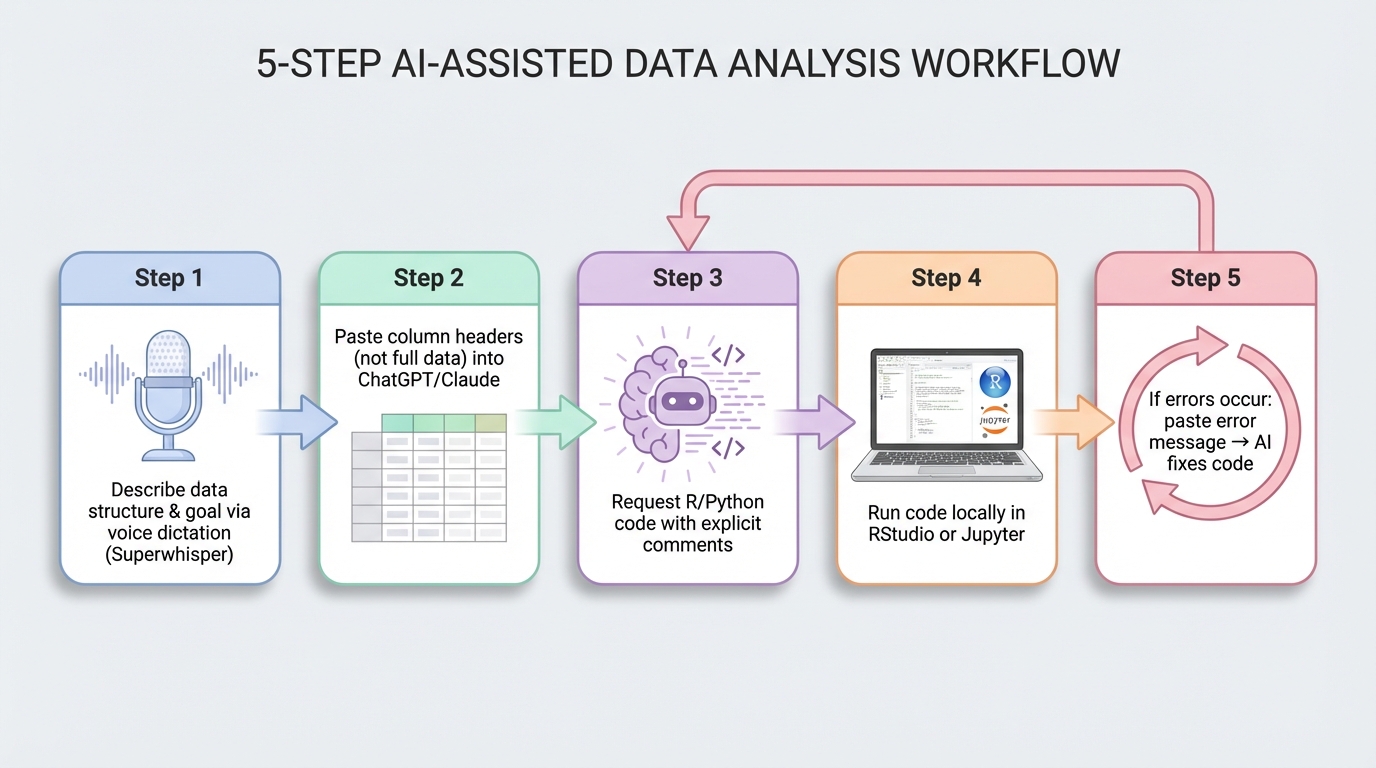
The secure workflow: AI writes code, you run it locally. Data never leaves your machine.
This keeps your data local, lets you verify every step, and still gets you 80% of the coding speed boost.
Where AI Excels
AI is genuinely great at:
- Data cleaning: Handling missing values, recoding variables, merging datasets
- Unstructured → structured: Parsing text, extracting fields from clinical notes, organizing messy spreadsheets
- Boilerplate code: ggplot2 syntax, pandas transformations, SQL queries
It's okay at:
- Statistical modeling: It knows the syntax, but you need to verify assumptions
- Debugging: Good at obvious errors, bad at subtle logic bugs
It's bad at:
- Knowing what analysis to run: That's your job
- Interpreting clinical significance: It doesn't know your field
Visualization and Figures: Trust But Verify
The short version: Never let AI create publication figures directly. Use it to generate code or components, then you assemble and verify everything.
Many tools advertise AI-generated visualizations. Most are just ChatGPT wrappers with a fancy UI. Before paying for any tool, verify what it actually does that you can't do yourself with a good prompt.
Quick Exploratory Visualizations
For exploring your data (not publication), Claude's Artifacts and ChatGPT's Code Interpreter can generate quick plots. Upload a CSV or JSON (never PHI—use synthetic/de-identified data only), and ask for a visualization. This is useful for:
- Sanity checking distributions
- Spotting outliers
- Deciding which variables to model
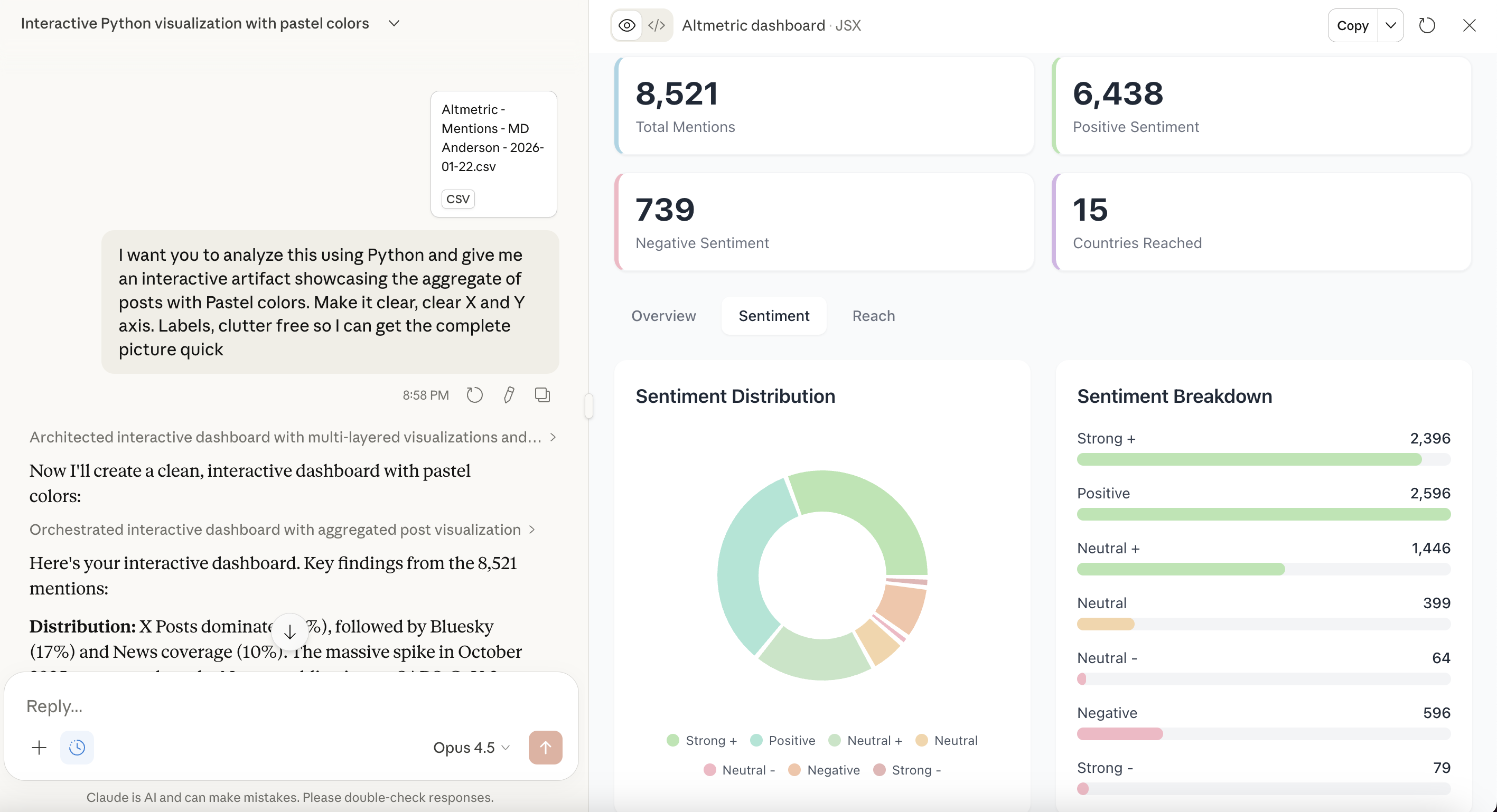
Quick exploratory viz via artifacts—useful for data QC, never for publication.
But these are exploratory only. For anything publication-bound, generate the code and run it yourself in R or Python.
Publication Figures: The Reliable Workflow
For publication-quality figures, ask AI for the code, run it locally, verify the output. Never trust browser-executed plots for your paper. You need to:
- Inspect the data transformation
- Verify statistical calculations
- Adjust aesthetics and labels
- Export at publication resolution
AI is excellent at writing ggplot2, matplotlib, or seaborn code. You're excellent at knowing whether the result is correct.
Scientific Icons and Workflow Diagrams
Publication figures often need custom icons (workflow diagrams, conceptual figures, graphical abstracts). Here's the workflow that actually works:
Step 1: Generate individual icons with AI image generation
Use specific, structured prompts. Example:
Create a clean, scientific icon of [YOUR SUBJECT] in BioRender style. Vector design with subtle gradients, isometric perspective. Professional medical/scientific illustration aesthetic. Simple geometric shapes, clean lines. White/transparent background. High contrast, suitable for presentations and publications. No text, no labels.
Example: Linac Icon
Create a clean, scientific icon of linac radiation machine in BioRender style. Vector design with subtle gradients, isometric perspective. Professional medical/scientific illustration aesthetic. Simple geometric shapes, clean lines. White/transparent background. High contrast, suitable for presentations and publications. No text, no labels.
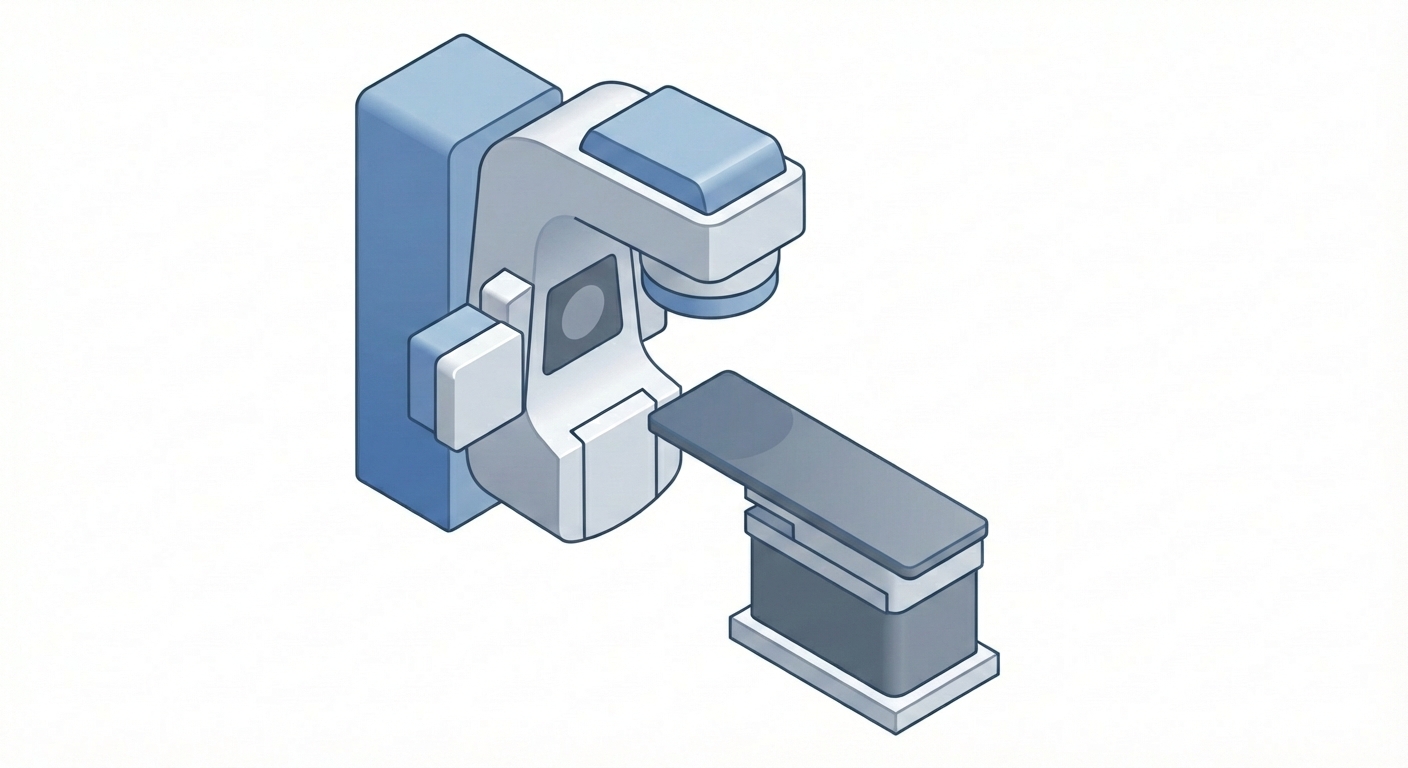
Step 2: Compose in Canva or BioRender
Once you have individual icon PNGs:
- Import them into Canva (free) or BioRender (institutional subscription)
- Arrange, add arrows, add labels
- Export at 300 DPI for publication
This gives you full control over the final layout while leveraging AI for the tedious part (creating individual visual elements). And critically: you're in the loop. You verify each component before assembly.
Always Disclose AI Use
If you use AI to generate any visual elements, icons, or assist with figure creation, disclose it in your methods or figure legends. Journal policies vary, but transparency is non-negotiable. Most allow AI-assisted figures if disclosed and verified.
Not Everything Needs an LLM
If you're doing basic descriptive stats, you don't need AI. If you're running a standard regression you've done 20 times, you don't need AI. Use it when you're learning a new method, working in an unfamiliar language, or dealing with messy data that needs creative wrangling.
Writing: Structured Instructions and Templates
AI for writing is covered extensively in AI for Research Writing, but here's the short version:
Be aggressive about structure. Don't just paste your draft and ask for "feedback." Give the AI explicit instructions:
- "Rewrite this paragraph to emphasize the clinical impact"
- "Make this introduction more direct—cut the hedging"
- "This methods section is too vague. Add specificity without adding length"
Use collaborative tools. ChatGPT Canvas and Google Docs with Gemini let you write alongside AI. I dictate my thoughts via Superwhisper, dump them into Canvas, and iteratively wrangle the draft.
Templates are your friend. I have templates for how I write introduction paragraphs, how I structure results, how I frame limitations. I feed those to the AI as examples and say "match this style." Over time, you build a library of instructions that work for you.
The more specific you are, the less you have to edit afterward.
When AI Doesn't Help
A few things AI genuinely can't do:
- Decide your research question: That's your insight, your clinical observation, your expertise
- Know your field's norms: It doesn't know what JAMA wants vs. what JCO wants
- Replace statistical judgment: It can write the code for a multivariable model, but it can't tell you which covariates to include
- Make your work original: It summarizes what exists. You create what doesn't.
Use AI for execution. Keep the thinking for yourself.
The Core Principle: Trust But Verify
AI accelerates research. It doesn't replace rigor. Every output—code, figures, text—needs verification. Models hallucinate. They make up citations, statistics, and results. Your job is to catch it.
Before you use any AI tool for research:
- Understand what it actually does (many are just ChatGPT wrappers with markup)
- Verify outputs independently (run code yourself, check references, validate stats)
- Disclose AI use in your methods (transparency is non-negotiable)
- Keep sensitive data local (never upload PHI to web-based tools)
Used correctly, AI collapses the time from idea to publication. Used carelessly, it collapses your credibility. The difference is verification.